
Fine Tuning One’s Skin
SkinFiner is a photo editor developed by Chengzhu Li. The multimedia software provides professional-grade, photo portrait retouching. Users can remove blemishes and other skin imperfections through simple photo-editing tools and features. It can run as a stand-alone application or a plug-in for photo editing software. The photo editing process retains the texture and quality of the image for natural-looking photo portraits. Users can share flawless photo portraits on social media platforms to look better than others. Moreover, it is also Windows 11 compatible.
Top Recommended Alternative
Retouching Imperfections
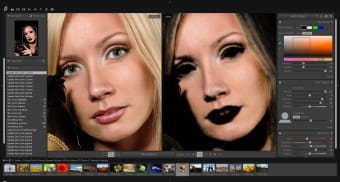
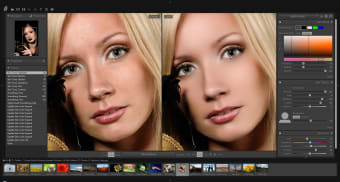
SkinFiner helps everybody on photo editing photo portraits of real people. The software is made for casual users who lack any photo editing skills or just wanted to get their photos retouched within few clicks. It functions as a plugin for Adobe Photoshop or Adobe Lightroom. Users can also use this software as a standalone photo editor if they are not using Adobe. It comes with pre-defined presets, at the same time, users can customize their photo editing presets. The software features Auto-Skin-Mask that can analyze facial parts to be retouched. It professionally smoothes skin, at the same time remove any skin imperfections. Some of the removable imperfections are blemishes, pores, blackheads, and uneven tones. The skin texture is still retained for a very natural looking photo portrait. There are automatic and manual options for the fine-tuning. The software searches for any redness and yellow coloration on the photo portrait through color sliders. It is also built with a full-time processing architecture with 16-bit per channel color depth. This ensures advanced color adjustments while keeping important image details. The Natural Skin Tone Enhancing offers optimal skin tones. Users can select different skin colors of their choice. They can adjust the skin lighting to show better features of their photo portrait. It allows alteration of the photo portrait’s shadows and highlights, as well as brightness and contrast. The Natural Skin Tone Enhancing can give mediocre photo portraits a healthier and more radiant skin. The fully color managed software produces correct colors. It works even with any color space used on the photo editing workflow. This also allows conversion of photo portraits to specified color profiles. The software includes batch processing for fixing dozens of photo portraits.
Temporary Skin Perfection
SkinFiner is created for users who are very conscious of their appearance. The software corrects skin imperfections in the photo portrait with its easy to use tools. Both users and non-Adobe users can process one or more photo portraits through an automated procedure.